





How to Set Up IPTV on “IPTV” App
🌟 Why Choose the “IPTV” Application?
The “IPTV” app (available on Android) transforms your device into a powerful streaming center, perfect for watching live TV channels from various sources. With VLC integration and multiple playlist support, it offers a premium viewing experience.
📥 Download Now:
IPTV App on Google Play
🚀 Quick Setup Guide (6 Simple Steps)
1️⃣ Install the App
-
Download from Google Play Store
-
Open the application
2️⃣ Access Edit Mode
-
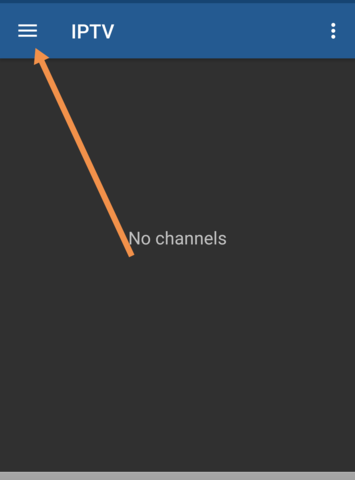
Tap “EDIT” (bottom of screen)
-
Click “+” to add new content
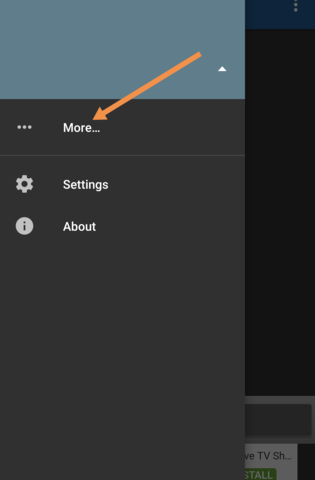
3️⃣ Add Your Playlist
-
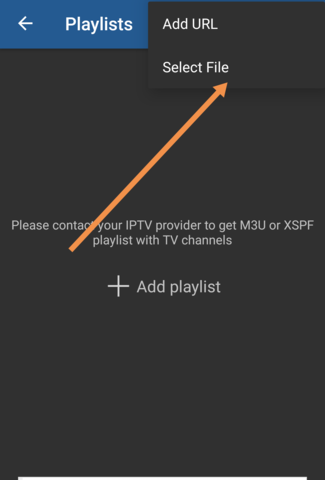
Select “Add URL”
-
Enter your M3U URL or upload file
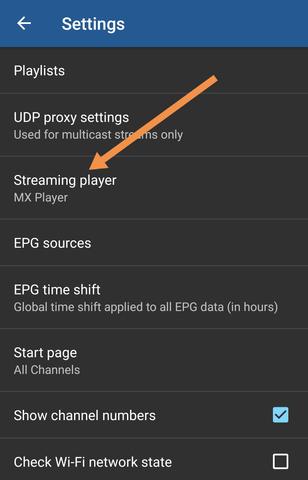
4️⃣ Choose Player
-
Select VLC for best performance (recommended)
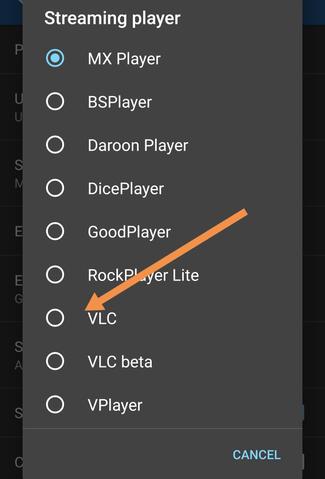
-
Or choose MX Player/IPTV Core Player
5️⃣ Start Streaming!
-
Channels will load automatically
-
Enjoy your content
💎 Key Features
✅ Multi-Format Support (M3U/XSPF)
✅ Advanced EPG (XMLTV & JTV formats)
✅ Multiple View Modes (Grid/List/Tile)
✅ UDP Proxy for multicast streams
✅ VLC Integration for superior playback
🔧 Pro Tips
✔️ Use VLC for best streaming quality
✔️ Enable auto-reconnect in Pro version
✔️ Try grid view for better navigation
💬 We Value Your Feedback!
Have questions or suggestions? Help us improve by sharing your thoughts below! 💬👇
Developed by iptvhelpcenter.net
