





How to Set Up IPTV on Enigma2 Using the XtreamTV Plugin?
In this guide, we will walk you through the steps to set up IPTV channels on your Enigma2 device using the XtreamTV plugin. You’ll need a computer to follow this tutorial. Let’s get started!
Steps to Add IPTV Channels to Enigma2 via XtreamTV Plugin
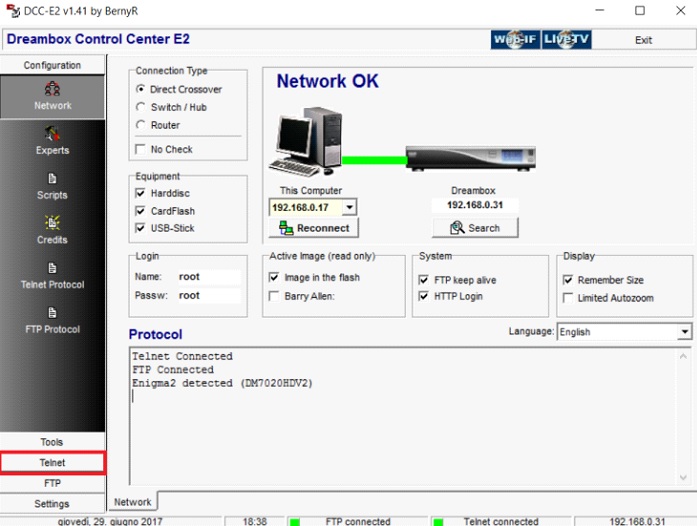
Download the Necessary Files: First, download the XtreamTV plugin or the latest version, XtreamTV 2.3, and the DCC_E2 (Dreambox Control Center for Enigma2). Extract the files and open DCC_E2. Enter the IP address of your Enigma2 device and use “Root” as both the username and password. Click “Reconnect.”
Note: Find your device’s IP address under Menu > Information > Network.
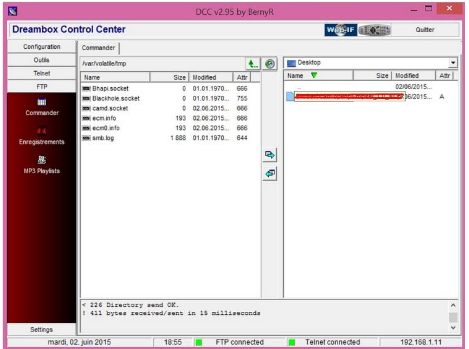
Upload the XtreamTV Plugin: After connecting successfully, go to the “FTP” section. Navigate to the path “/var/temp/” and upload the XtreamTV plugin from your computer to this folder.
For plugin version compatibility:
-
-
Mips32el: Most boxes like VU Zero, Vu+ Duo, Zgemma, etc.
-
Mipsel: Older boxes such as DM800 clones.
-
Sh4: Used by Spark-like boxes.
-
Armv7a: Newer devices like Vu+ 4k.
-
Install the Plugin via Telnet: Go to the “Telnet” section in DCC_E2 and enter the following commands:
opkg install /tmp/XtreamTV_0.0.1_armv7a.ipk

opkg install /tmp/XtreamTV_0.0.1_mips32el.ipk

opkg install /tmp/XtreamTV_0.0.1_mipsel.ipk

opkg install /tmp/XtreamTV_0.0.1_sh4.ipk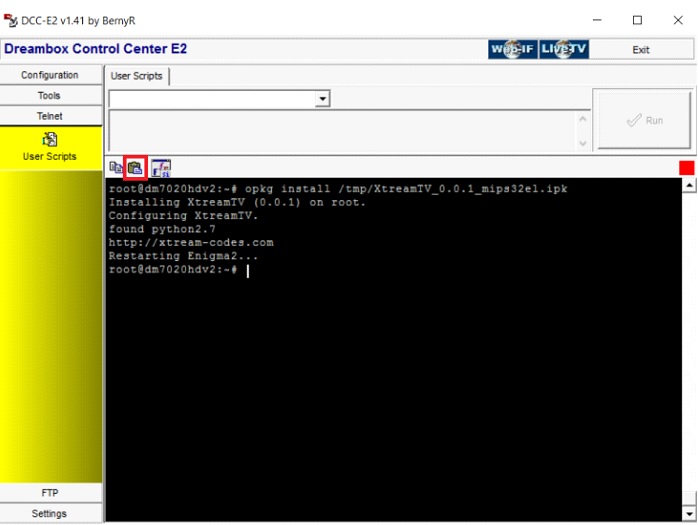
Provide XtreamTV Plugin ID: Once the plugin is installed, you need to provide your XtreamTV plugin ID (Mac address) to your IPTV provider or add it to your IPTV dashboard. You can find the XtreamTV Plugin ID under “Device Details” in the plugin on your Enigma2 device.
Quick Overview of Enigma2
Enigma2 is an Operating System designed for set-top boxes, offering features like customizable skins, bouquets for organizing channels, and picons (logos for channels). It supports plugins like XtreamTV to enhance its functionality.
We’d love to hear from you! If you have any questions about this tutorial or feedback about our website, feel free to share your thoughts in the comments. Your suggestions and opinions help us improve and serve you better. 💬👇
Developed by iptvhelpcenter.net
