





How to Set Up IPTV on Kodi: Complete Guide (Windows/Android/Firestick)
🔍 What is Kodi?
Kodi is a powerful open-source media center that transforms any device into a streaming powerhouse. It supports:
-
150+ file formats
-
Custom add-ons
-
IPTV integration
-
Cross-platform compatibility (Windows/Android/macOS/Linux)

📥 Step-by-Step Installation Guide
🖥️ Step 1: Download Kodi
-
Visit kodi.tv/download
-
Select your OS (Windows shown)

-
Choose 64-bit or 32-bit version

![Kodi download page screenshot]
⚙️ Step 2: Install PVR IPTV Simple Client
-
Open Kodi → Add-ons → Download


-
Select PVR Clients

-
Install PVR IPTV Simple Client

![PVR client installation screenshot]
🔗 Step 3: Configure M3U Playlist
-
Go to My Add-ons → PVR Clients
-
Select Configure

-
Enter your provider’s M3U URL

-
Click OK

![M3U configuration screenshot]
🗓️ Step 4: Add EPG Guide
-
Navigate to EPG Settings
-
Paste your XMLTV URL


-
Enable the add-on

![EPG setup screenshot]
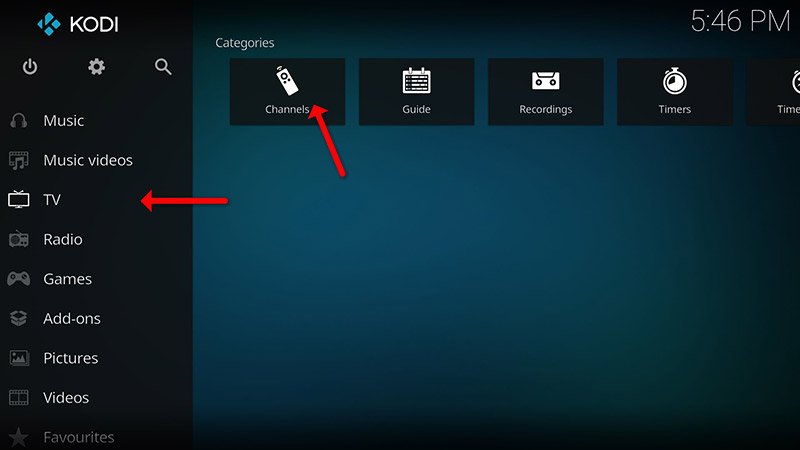
📺 Step 5: Access Channels
-
Return to Kodi home
-
Select TV → Channels
-
Wait for channel update

![Kodi TV interface screenshot]
💡 Pro Tips for Better Experience
✔ Reduce buffering: Adjust cache settings
✔ Customize skins: Personalize your interface
✔ Use a VPN: For secure streaming
✔ Regular updates: Keep Kodi current
🌟 Why Choose Kodi for IPTV?
-
Free and open-source
-
No subscription required
-
Highly customizable
-
Multi-device support
💬 We’d love to hear from you! If you have any questions about this tutorial or feedback about our website, feel free to share your thoughts in the comments. Your suggestions and opinions help us improve and serve you better. 💬👇
Developed by iptvhelpcenter.net
