





Complete Guide: Setting Up IPTV on TVIP Box
The TVIP Box is a powerful multimedia device that supports high-quality IPTV streaming, video-on-demand (VOD), OTT apps (YouTube, social networks), and even web browsing. Similar to MAG Boxes, it offers a seamless IPTV experience with advanced features.
⚡ Key Features of TVIP Box
✔ Supports M3U Playlists & MAG Portal
✔ Timeshift & Recording (via USB/SD)
✔ EPG (TV Guide) Support
✔ USB Media Playback (MKV, AVI, MP4)
✔ Wi-Fi & Ethernet Connectivity
⚙ How to Set Up IPTV on TVIP Box (New Models: 605, 615)
Method 1: Using MAG Portal (Recommended)
-
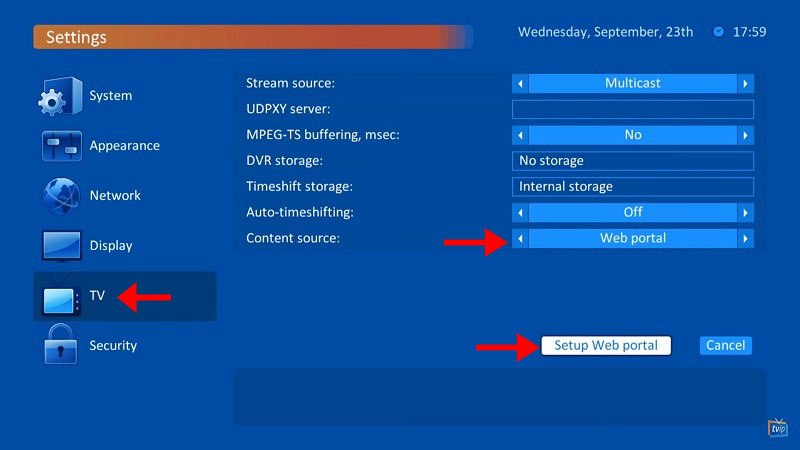
Go to Settings → TV → Change “Content Source” to “Web Portal”


-
Set API Mode to “MAG”
-
Enter your Portal URL (from your IPTV provider)
-
Restart the box
-
Provide your MAC address to your provider (found on the back of the box)

-
Wait for channels to load → Enjoy!

Method 2: Using M3U Playlist
-
Go to Settings → TV → Change “Content Source” to “M3U Playlist”

-
Enter your M3U URL (from your provider)
-
Restart the box → Stream instantly!
🔄 Setup for Older TVIP Boxes (e.g., 410)
-
Go to Settings → TV → Select “Web Portal”

-
Enter your Portal URL (If “MAG” isn’t available, use “GSTB” API)

-
Restart & wait for channels to load


🔥 Why Choose TVIP Box?
-
Smooth streaming with powerful CPU
-
USB & SD card support for local media
-
Learning remote with TV control
-
Supports multiple streaming protocols (RTSP, HTTP, UDP)
💬 We’d love to hear from you! If you have any questions about this tutorial or feedback about our website, feel free to share your thoughts in the comments. Your suggestions and opinions help us improve and serve you better. 💬👇
Developed by iptvhelpcenter.net
