





How to Add EPG to Perfect Player: Complete Guide
Perfect Player is a versatile IPTV player that supports Electronic Program Guide (EPG) for enhanced TV viewing. Follow these simple steps to add EPG and never miss your favorite shows!
🔧 Step-by-Step EPG Setup
1️⃣ Access Settings
-
Open Perfect Player
-
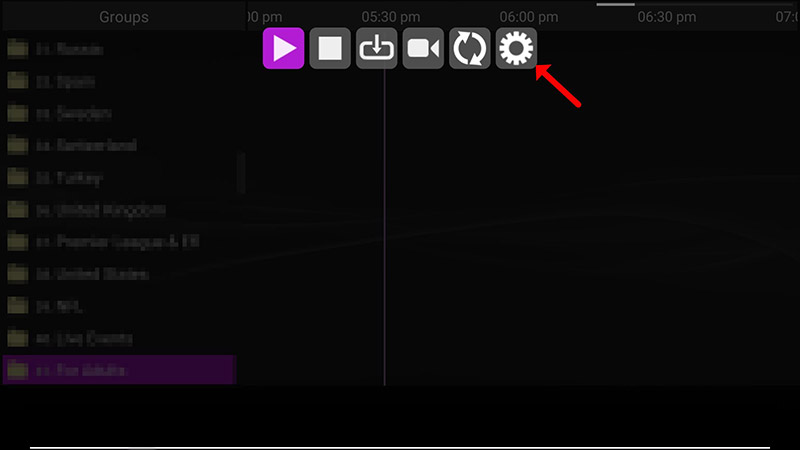
Click on “Settings” (⚙️ icon)
2️⃣ Add EPG URL
-
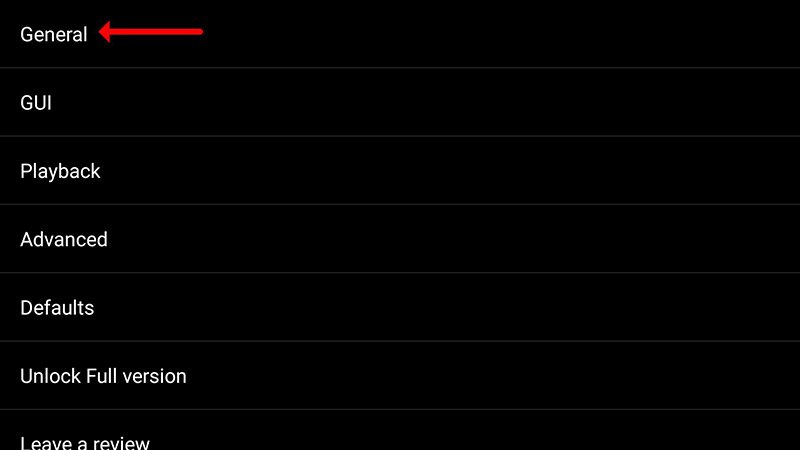
Select “General”
-
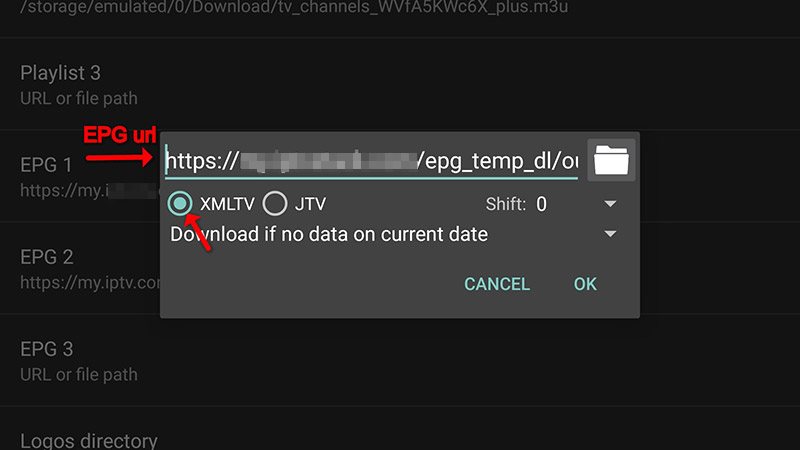
Choose “EPG URL or file path”
-
Enter your EPG URL (provided by IPTV provider)
-
Click “OK”

3️⃣ Finalize Setup
-
Restart the application
-
Wait for EPG data to load (may take a few minutes)
💡 Pro Tips
✔️ You can add multiple EPG URLs for comprehensive listings
✔️ Ensure your EPG URL is active and updated
✔️ Use XMLTV format for best compatibility
🌟 Why Use Perfect Player?
✅ Lightweight and fast performance
✅ Cross-platform (Windows, Android, Linux)
✅ Customizable interface
✅ Supports M3U playlists and EPG
💬 We’d love to hear from you! Questions or feedback? Share your thoughts below! 💬👇
Developed by iptvhelpcenter.net
