





How to Set Up IPTV on IPTV Smarters Pro
IPTV Smarters Pro is one of the most user-friendly apps for streaming Live TV, VOD, Series, Catch-up, and Multi-Screen on various devices such as Android, iOS, Smart TVs, and Android Boxes. It’s an excellent choice for IPTV enthusiasts, especially with its unique Catch-up feature, which allows you to watch missed content.
Compatible Devices for IPTV Smarters Pro
You can use IPTV Smarters Pro on the following devices:
-
Android Smartphones
-
iOS Devices (iPhone, iPad)
-
Smart TVs (Samsung, LG, etc.)
-
Android Boxes
-
Apple TV
-
Firestick
-
Computers (Windows and Mac)

How to Download IPTV Smarters Pro
You can download IPTV Smarters Pro from the official IPTV Smarters website. Here are the specific download links for different devices:
-
Android Devices: Download the APK file here
-
Samsung Smart TV: Search for IPTV Smarters Pro on the Smart HUB.
-
LG Smart TV: Find the app in the LG Content Store.
-
Apple Devices: Download the app from the Apple App Store.
-
Windows PC: Download the EXE file for Windows.
-
Mac PC: Download the DMG file for Mac.
-
Firestick: Install via the Downloader app and follow setup steps outlined in the guide.
How to Add IPTV Channels to IPTV Smarters Pro
You can add IPTV channels using two methods: Xtream Codes API or M3U Playlist. We recommend Xtream Codes API for access to the Catch-up feature and automatic EPG loading.
Method 1: Setting Up via Xtream Codes API
-
Install the app on your device.
-
Open the app and select Add User > Login with Xtream Codes API.

-
Enter a name (e.g., “IPTV Xtream”), then fill in your Username, Password, and Server URL from your M3U line.
-
Click Add User and wait a few seconds.


-
Go to Live TV, select a channel group, and enjoy your IPTV content.


-
For EPG, simply click Install EPG without entering any URLs.

For Samsung and LG Smart TVs, use the URL http://smarters.link and input the required credentials.
Method 2: Setting Up via M3U Playlist
-
Install the app on your device.
-
Open the app and select Add User > Login with Playlist.

-
Enter a name (e.g., “IPTV Playlist”) and paste your M3U URL.

-
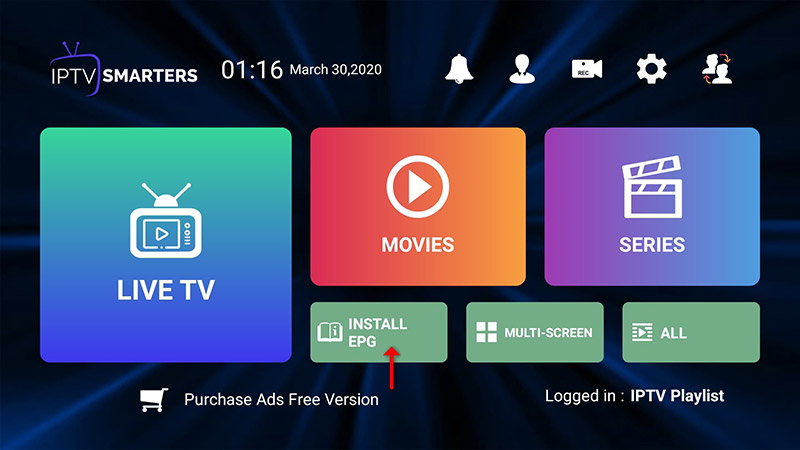
Click Install EPG and enter the EPG URL.

-
Choose a channel group from Live TV and start streaming.
Key Features of IPTV Smarters Pro
-
Live TV, Movies, Series, and Catch-up Streaming
-
Multi-Screen support: Watch up to 4 channels simultaneously
-
EPG Support for easy program navigation
-
Parental Control settings for each category
-
Built-in powerful player for smooth streaming
-
Support for external players
-
Attractive and user-friendly interface
-
Dynamic language switching options
Conclusion
With IPTV Smarters Pro, you can enjoy a seamless IPTV experience across various devices. Whether you’re watching Live TV, catching up on missed shows, or enjoying multi-screen viewing, this app makes streaming easy and enjoyable.
We’d love to hear from you! If you have any questions about this tutorial or feedback about our website, feel free to share your thoughts in the comments. Your suggestions and opinions help us improve and serve you better. 💬👇
Developed by iptvhelpcenter.net
