





Can I Use IPTV Services on an Old TV? Here’s How to Make It Work
If you’re still using an older television that lacks smart features, you might be wondering whether it’s possible to stream IPTV content. The good news is: Yes, you can! All you need is a compatible IPTV media box (also called a Set-Top Box or STB) that can bridge the gap between your old TV and modern IPTV services.
In this guide from iptvhelpcenter.net, we’ll explain how to bring IPTV streaming to any non-smart TV using different types of media boxes.
🖥️ What Is an IPTV Media Box?
An IPTV media box connects your TV to the internet and functions as an IPTV receiver. It allows you to access live TV, movies, apps, and even games. These devices can transform your regular TV into a smart TV.
Popular IPTV-compatible boxes include:
-
MAG Box
-
Android TV Box
-
Enigma2 Box
-
Apple TV
-
Roku
-
Amazon FireTV
-
Nvidia Shield TV
-
Google Chromecast
🔁 Why Use a Set-Top Box with an Old TV?
Smart TVs have built-in apps and internet connectivity. Old TVs don’t — but you can replicate those features by adding a set-top box, giving you access to:
-
IPTV streaming
-
Online video services (like Netflix, YouTube)
-
Music, podcasts, and Android/iOS apps
-
Gaming platforms and more
🔧 Types of Setup Boxes You Can Use
✅ Android-Based Boxes
With an Android TV box, you get access to the Google Play Store, where you can download IPTV apps, Android games, and entertainment apps.
⭐ Top Pick: Nvidia Shield TV
This high-performance Android box supports both IPTV and gaming, and it comes with a controller for enhanced gameplay.
✅ iOS-Based Setup Boxes
Apple TV runs on tvOS and allows users to stream video, music, and podcasts, plus access the App Store for downloading apps and games. Apple TV features:
-
Siri voice control
-
A touch-sensitive remote
-
Built-in motion sensors for gaming
It’s a great alternative to Android-based devices for Apple users.
✅ MAG Boxes (Infomir)
MAG boxes are among the most trusted devices in the IPTV space. Produced by Infomir since 2007, MAG devices are:
-
Optimized for IPTV services
-
Easy to set up and use
-
Equipped with powerful hardware
⚠️ New MAG models come with Android OS. Make sure your IPTV provider supports these versions before purchasing.
Learn more: How to Set Up IPTV on MAG
🔌 How to Connect a Setup Box to an Old TV
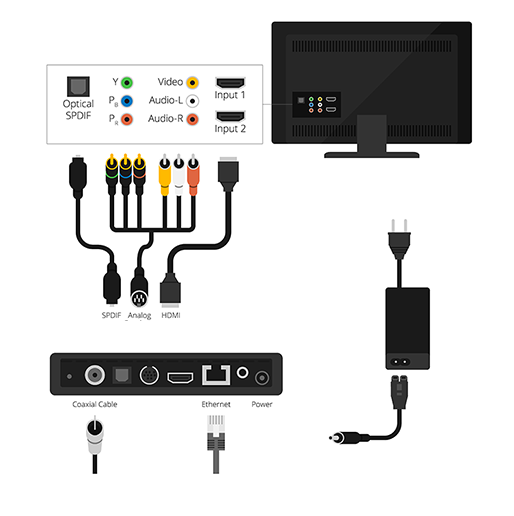
Setting up a media box is simple. Follow these steps:
-
Place the TV box near your television.
-
Plug the power adapter into an electrical outlet.
-
Use an HDMI cable to connect the box to your TV (if your TV doesn’t have HDMI, you’ll need an AV-to-HDMI converter).
-
Switch the TV input to the correct HDMI port.
-
Connect the box to the internet (via Wi-Fi or Ethernet).
-
Power on the box — it will boot up and be ready to use.
Once the device starts, you can launch your IPTV app and start watching!
✅ Final Thoughts
Even if your television is not a Smart TV, you don’t need to miss out on IPTV. With a wide range of affordable and powerful IPTV-compatible boxes, you can enjoy all the modern features of streaming without having to replace your existing TV.
For more detailed setup guides and IPTV device support, visit iptvhelpcenter.net — your trusted source for everything IPTV.
