





How to Record IPTV Streams in VLC: The Complete Guide
VLC Media Player is the versatile open-source player that lets you record live IPTV streams effortlessly. Here’s how to capture your favorite shows in just a few clicks!
🔧 Step-by-Step Recording Guide
1️⃣ Open Recording Settings
-
Launch VLC
-
Click Media → Convert/Save
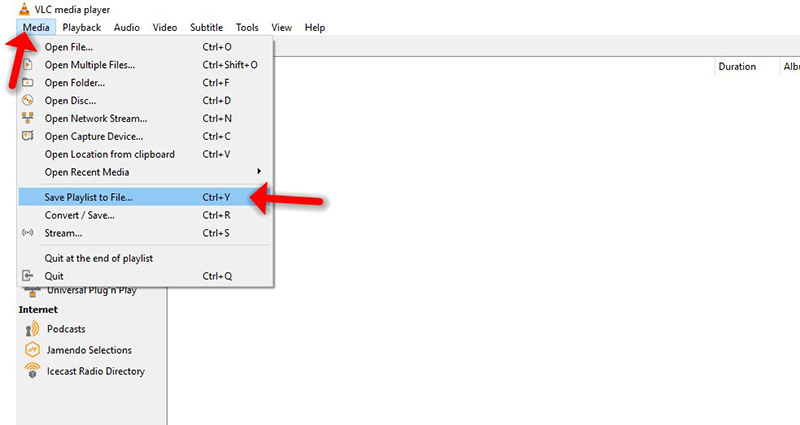
-
Select “Capture Device” tab
-
Choose “Desktop” as capture mode
2️⃣ Adjust Recording Quality
-
Increase frame rate (default 1fps is too low)
-
Click “Convert/Save” to continue

3️⃣ Set Output File
-
Choose destination folder

-
Optional: Check “Display output” for preview
-
Click wrench icon to customize:
-
Resolution (set scale to 1.0 for full HD)
-
Video codec (H.264 recommended)

-
4️⃣ Start Recording
-
Click “Start” to begin capture
-
Play your IPTV stream normally
-
Click “Stop” when finished
💡 Pro Tips for Best Results
✔️ Use hardware acceleration if available
✔️ Record in MP4 format for compatibility
✔️ Allocate enough disk space for long recordings
✔️ Close other apps to reduce system load
🌟 Why Use VLC for IPTV Recording?
✅ Free & cross-platform (Windows/Mac/Linux)
✅ No extra software needed
✅ Customizable output settings
✅ Lightweight & reliable
💬 We’d love to hear from you! Questions about recording IPTV? Ask below! 💬👇
Developed by iptvhelpcenter.net
