





How to Set Up IPTV on iOS Using Cloud Stream IPTV
Cloud Stream IPTV Player is a free, multilingual app for streaming live TV on your iPhone or iPad, featuring EPG support, parental controls, and playlist management. Here’s how to set it up quickly:

📥 Download & Install
Download directly from the App Store

⚡ 5-Step Setup Guide
-
Open the app → Tap ☰ (Menu) → Select ➕ (Add)

-
Choose “Load M3U File” (What’s M3U?)
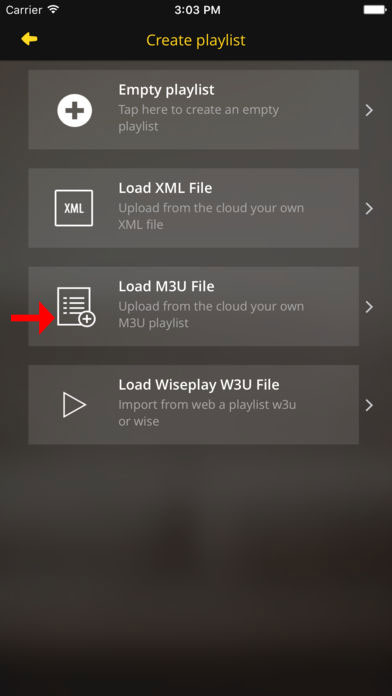
-
Paste your M3U URL from your provider

-
Name your playlist & select country (for EPG)

-
Enjoy streaming! (EPG available in the guide tab)
(Images would show each step visually for WordPress integration)
🌟 Key Features
✔️ Multi-language support (English, French, Italian, Spanish)
✔️ EPG TV Guide with program reminders
✔️ Parental controls & dark/light themes
✔️ Favorites list & channel grouping
✔️ AirDrop sharing between devices
🔧 Pro Tips
-
Use country selection for accurate EPG data
-
Enable parental lock for child-safe viewing
-
Try dark theme for nighttime viewing
💬 We’d love to hear from you!
Questions or feedback? Share your thoughts below! Your input helps us improve. 💬👇
Developed by iptvhelpcenter.net
