





How to?
How to Change Audio Track in VLC Media Player: Quick Guide
🎬 Why Change Audio in VLC?
Many IPTV channels (especially international broadcasts) offer multiple audio tracks (e.g., original language, dubs, or commentary). VLC Media Player makes it easy to switch between them.
⚡ 3-Second Audio Switching
-
Right-click the video playback
-
Hover over Audio → Audio Track
-
Select your preferred language
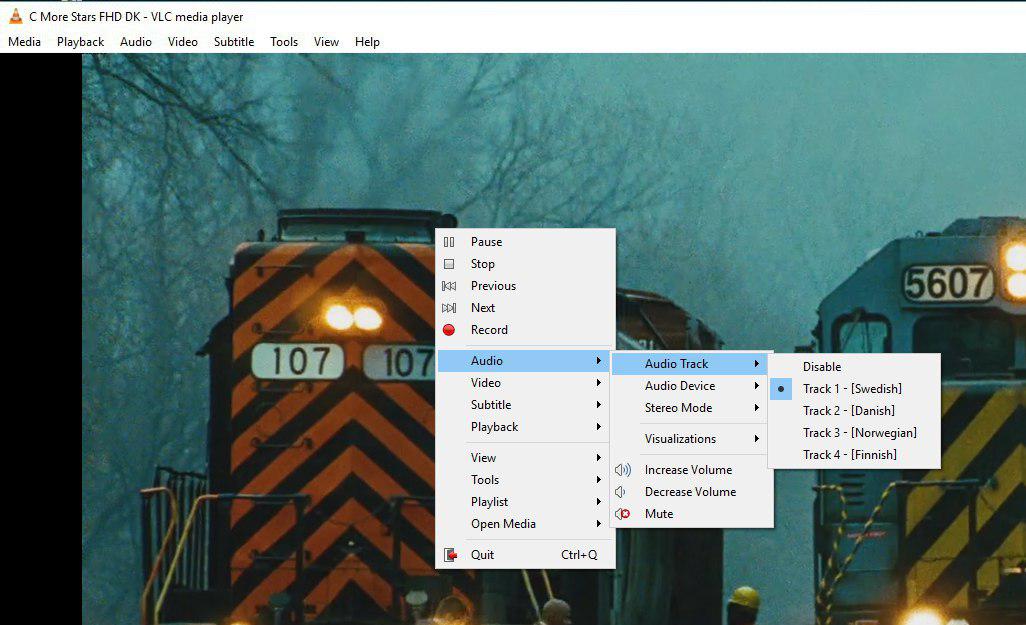
(Tip: Use shortcut Ctrl+B to cycle through audio tracks!)
🌐 Advanced Audio Options
✔ Stereo/Mono adjustment (Tools > Track Synchronization)
✔ Audio delay correction for sync issues
✔ Equalizer for custom sound profiles
💬 We’d love to hear from you! Need help with other VLC features? Ask below! 💬👇
Developed by iptvhelpcenter.net
