





Ultimate Guide: How to Install & Set Up IPTV Smarters Pro on Any Device!
Looking to stream your favorite content seamlessly on multiple devices? 📱💻🖥️ Look no further than IPTV Smarters Pro—a powerful, user-friendly IPTV player that supports Live TV, VOD, Series, Catch-up, and Multi-Screen viewing. Whether you’re on an Android phone, Smart TV, Firestick, or a Mac, IPTV Smarters Pro is your all-in-one solution for top-tier IPTV streaming.
💡 What Makes IPTV Smarters Pro Stand Out?
Unlike many IPTV apps, IPTV Smarters Pro supports Catch-up TV—a rare feature previously limited to MAG boxes. Now, you can watch missed shows at your convenience on nearly all devices.
📌 Compatible Devices Include:
-
Android/iOS smartphones
-
Smart TVs (Samsung, LG)
-
Android Boxes
-
Apple TV
-
Firestick
-
Windows & macOS computers
You can also consider alternatives like GSE Smart IPTV, but Smarters remains the most comprehensive option.
🔧 How to Download IPTV Smarters Pro
Download the app safely from the official IPTV Smarters website.
📱 For Android Devices:
📺 Samsung Smart TV:
Use your remote, press Smart HUB, search “IPTV Smarters Pro”, and install version 1.0.4.
📺 LG Smart TV:
Go to Home > LG Content Store, search “IPTV Smarters Pro”, and install version 1.0.8.
🛑 Google Play Store:
Currently unavailable. We’ll update the link when available again.
🍎 iOS Devices & Apple TV:
💻 Windows or macOS:
🔥 Firestick:
-
Install Downloader App (search in YouTube for steps).
-
Enable: My Fire TV > Developer Options > Install Unknown Apps > Enable Downloader
-
Use Downloader to install this APK
🔨 How to Add IPTV Channels in Smarters Pro
⚙️ Method 1: Xtream Codes API (Recommended)
-
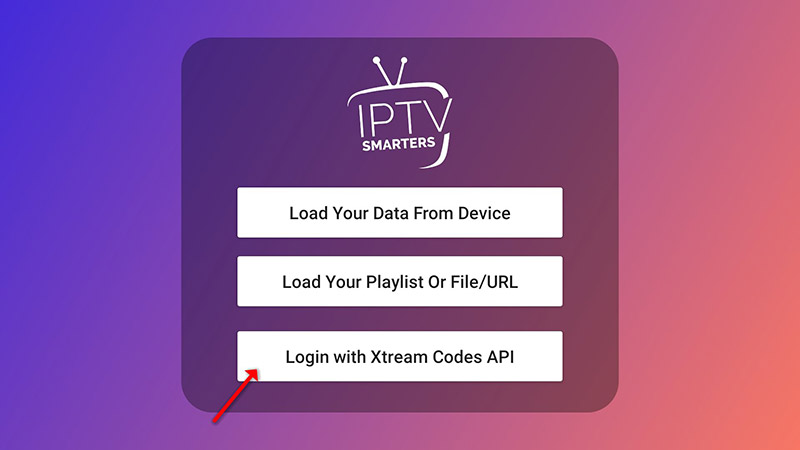
Open app > Add User > Login with Xtream Codes API
-
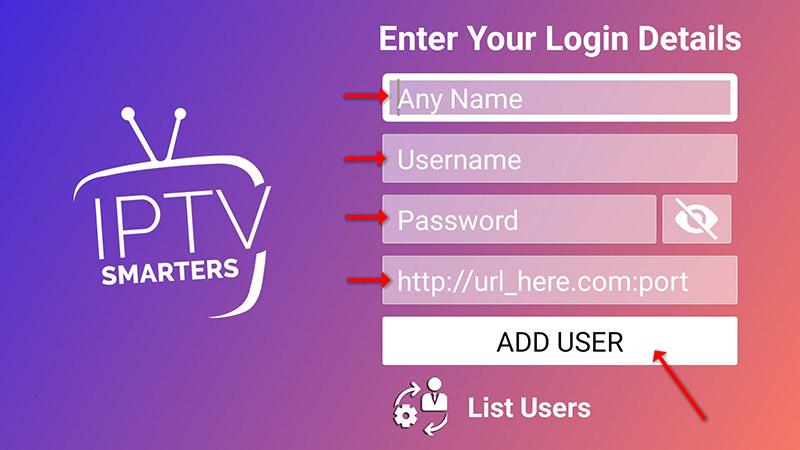
Enter:
-
Any name (e.g., IPTV Xtream)
-
Your Username, Password, and Server URL (from M3U line)
-
-
Click Add User

-
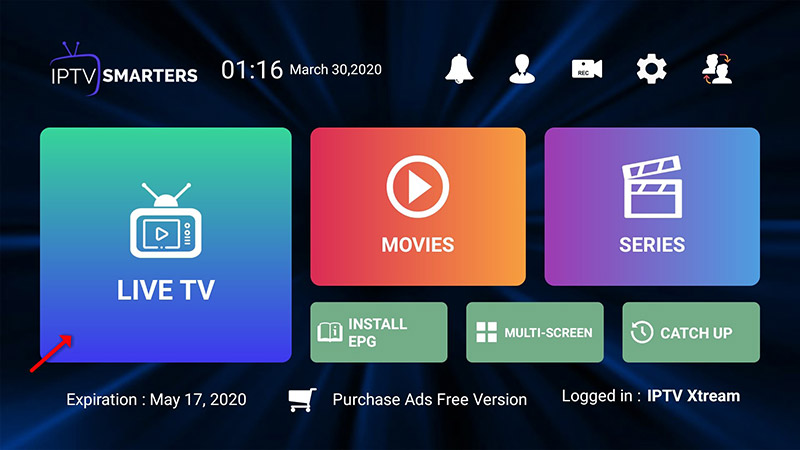
Open Live TV, choose your channel group, then your channel
-
Double-tap to enable full screen


-
Click Install EPG (no need to add a separate URL)

📺 For LG & Samsung Smart TVs, use: http://smarters.link
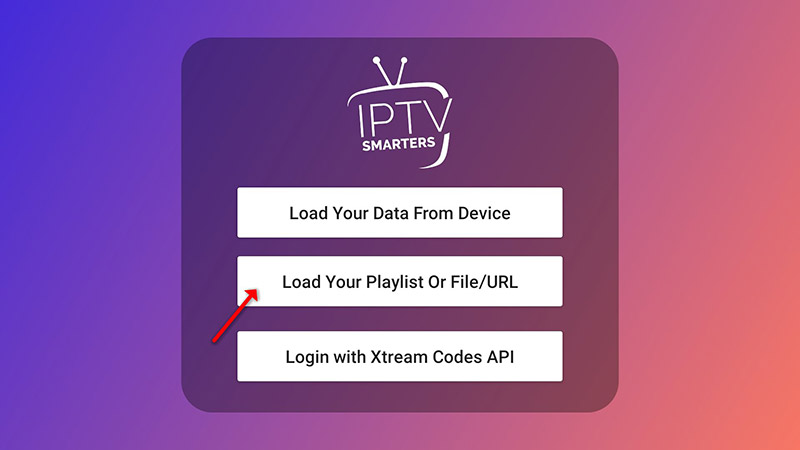
🎶 Method 2: Playlist (M3U URL)
-
Open app > Add User > Login with Playlist
-
Name it (e.g., IPTV Playlist)
-
Paste your M3U URL

-
Click Install EPG and enter the EPG link if available


-
Navigate to Live TV, pick your channel group, and enjoy!
🛠️ Key Features of IPTV Smarters Pro
-
📺 Live TV, Movies, Series
-
⏪ Catch-up streaming
-
⏺️ Record your favorite shows
-
🖥️ Multi-Screen support (watch up to 4 channels)
-
🧩 Built-in & External player support
-
🔐 Parental Controls
-
🌍 Dynamic language switching
-
✨ Modern & easy-to-use interface
We’d love to hear from you!
If you have any questions about this tutorial or feedback about our website, feel free to share your thoughts in the comments. Your suggestions and opinions help us improve and serve you better. 💬👇
Developed by iptvhelpcenter.net
